Cloud & Credits
Buying credits
Top up cloud credits without leaving the app.
Cloud generations are paid for with credits. You can buy them from inside SimpliGen at any time.
How to top up
- Open the Cloud item on the rail's bottom system strip to open the Cloud Account popover, then click Buy cloud credits. The same button appears on the cloud generate button when your balance is low.
- Pick a credit pack.
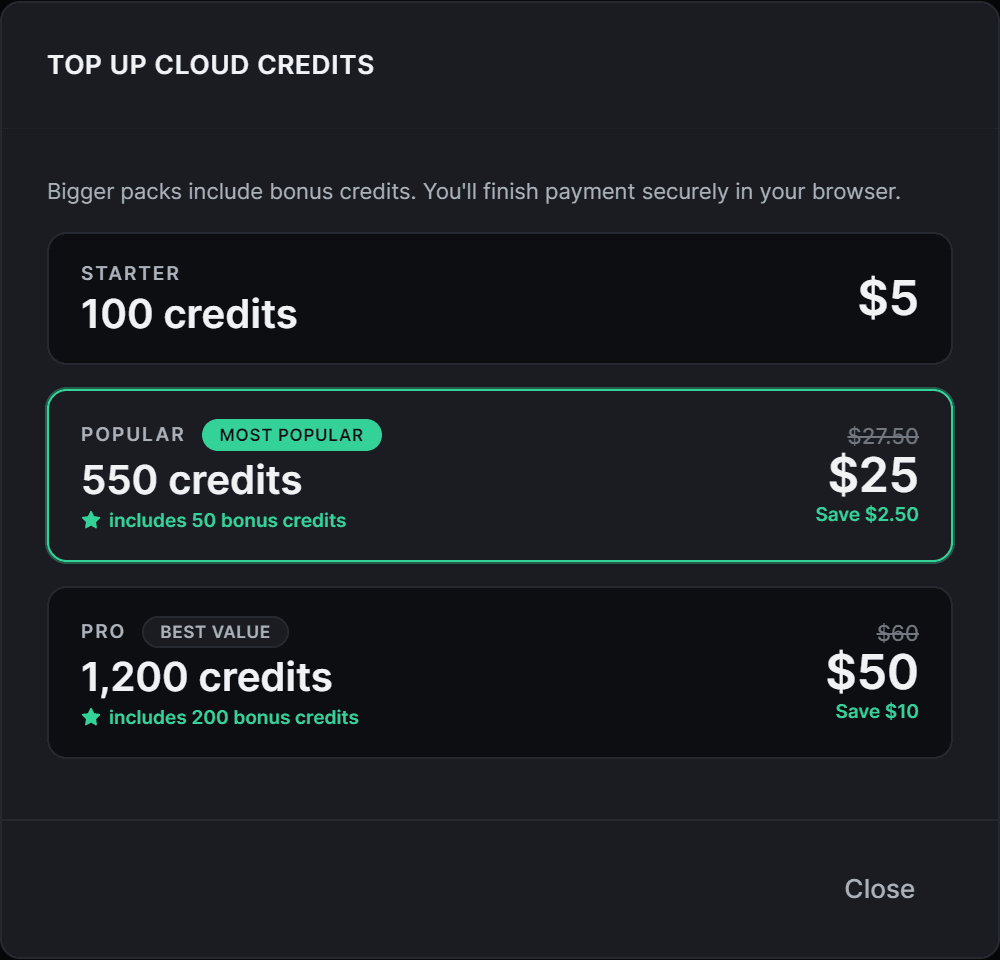
- Finish payment securely in the browser tab that opens.
- Come back to SimpliGen. Your balance refreshes automatically once payment completes.
Choosing a pack
- Bigger packs include bonus credits, so the larger tiers give you more credits per dollar.
- The most popular and best value packs are marked, so you can pick at a glance.
Good to know
- Payment happens in your browser, not inside the app, so your card details never touch SimpliGen.
- Your balance is shown on the Cloud item in the rail once you are connected.
- Credits are used only for cloud generations. Local generation on your own GPU is free.
To understand how many credits a generation uses, see What a generation costs.